What's new

Sharpness... Please help.

essentials

TPF Noob!
Joined
Jan 6, 2013
Messages
23
Reaction score
1
Location
California
Can others edit my Photos
Photos NOT OK to edit
So I was reading through Ken Rockwell's breakdown of the top 10 lenses for Nikon DSLR's (Nikon's 10 Best Lenses) and went out and picked up the Nikon 35mm f/1.8 DX thinking it would solve my sharpness issues...

Unfortunately, I'm starting to think that I am the problem, not my lens or the camera but in fact my current knowledge and skill level.

While at first glance this picture appears to be an incredibly sharp picture, which for the most part I suppose it is...


Vader

A closer look reveals a ton of low light noise... Still.
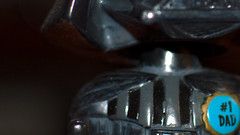

Vader

Are my expectations too high? Am I doing something wrong here?

I feel like I'm completely failing as a photographer but admittedly I still have a ton to learn. If I'm just expecting too much from my gear then set me straight and I'll deal with it til I can afford to get the quality I want but if I can extract more sharpness out of this setup then I would absolutely love the help and guidance.

Thanks for reading and thanks even more for any assistance :)

Camera: Nikon D3200
Lens: Nikon 35mm f/1.8 DX
Picture: ISO100, 35mm, f/1.8, 1/40s
 
Your image has no Exif data, and I dont see the Exif information on the site, either.

There is a LOT of reasons why you dont get sharp enough pictures.

- Colorfilter/demosaicing limits how sharp the image can be anyway
- No lens is perfect, thus there is almost always some loss through the optics
- Shake because you didnt use a tripod
- Movement of the subject because of too slow shutter speed
- Noise from high ISOs
- Blurr from being out of focus
- probably more, cant think of anything else right now

Ken Rockwell actually has a pretty decent article about this: Fixing Unsharp Images
 
After you bought that lens, did you immediately feel the need to install a UV filter?

If you did, that's probably your problem right there.
 
In this particular photo I can think of a few problems.

- Camera shake. You have a rather low shutter speed, you could try placing it on a tripod to see if that helps.
- Out of focus. You used a really large aperture. An aperture of f/1.8 with a subject at 1m distance will give you a depth of field of about 6cm. I'm guessing you may even have been closer as not even the eyes are fully in focus. Close down the aperture, see if that helps.
- Lens filters. Any filter (like the commonly used UV filters) will degrade quality to some degree. The amount depends on how expensive the filter was. Remove any filters to see if it helps.
 
Yes you have two problems. Too wide an aperture and too slow shutter speed. I have shaky hands so I don't like to go under 1/160.
 
Put your camera on a good, solid tripod in a well-lighted area, and pick a subject with good contrast (a sharpness test print works well). Use a low ISO (100 or 200), and stop your lens down at least two stop from maximum aperture. Remove any lens filters. Use a remote shutter release, mirror-up shutter release, or the self-timer function, but don't press the shutter release yourself. Take a shot and look at the sharpness.

This is about the BEST sharpness combination you can expect. If you aren't getting close to that then the problem is most likely in your technique. If the shot is still not sharp then something may be wrong with your camera or lens.
 
The Depth of Field is too shallow. Try to stop down the lens a little and see if that help. Most of the area of the Vader face are out of focus except the eyes area.
 
Thank you all for the feedback, much appreciated! I have a lot to learn. I'll play around with it some more tonight and see if I can improve the quality further.
 
A closer look reveals a ton of low light noise... Still.
Low light noise is not about sharpness, it's about exposure.
If you haven't seen it aready, here is some info about sharpness - Tutorials – Sharpness
Here is some info about image noise - Digital Camera Image Noise: Concept and Types

Dark portions of a photo will always show more image noise than the bright portions. That is because of the way digital images work.
The vast majority of the image data is in the brightest part of a photo, and the bright parts have a high signal-to-noise ratio (SNR). The dark parts have little of the data, and a low SNR.
You may find this helpful - http://wwwimages.adobe.com/www.adob...e/en/products/photoshop/pdfs/linear_gamma.pdf

You might want to learn about ETTR - Expose-To-The-Right - Exposing to the right - Wikipedia, the free encyclopedia
ETTR
Optimizing Exposure
 
stop your lens down at least two stop from maximum aperture.

Oh right, I actually forgot about that one. O_o

A lens is never at its sharpest when the aperture is wide open, it has a sweetspot which is usually a few stops down from wide open (which is why SCraig tells you to stop down).
 
"Sharp" isn't really a specific technical term. It's something we toss out all the time and it's really the sum of a lot of other factors. You mentioned "sharp" and then mentioned the noise. As Keith points out... noise is in no way related to "sharpness".

You may want to read this blog entry: LensRentals.com - Have You Seen My Acutance?

As for your image... every lens has a "sweet spot". For your particular lens (the 35mm f/1.8) the sweet spot turns out to be somewhere between f/2.8 and f/4. It's different on every lens and it's usually around 2 stops below wide-open.

Something to be careful about here... the f-stop will also alter the depth of field. Since your test subject isn't a flat object, with a low focal ratio (such as f/2.8 but especially at f/2 or f/1.4) the depth of field will be very thin and the difference in focused distance from the "front" of your subject to the "back" of your subject can cause some parts to look "sharp" (well focused such that we can resolve a lot of detail) while other parts looks "soft". If you use a higher f-stop (e.g. say f/11) then you'd fix the depth of field, but under extreme scrutiny you'd notice that the best focused areas at f/2.8 actually look slightly better than the best focused points at f/11 (even though more of the overall image is in focus at f/11). FURTHER... if you compare the quality in the middle of the image it wont be the same as the quality in the corners of the image (and this is normal for any lens. You can pay HUGE sums of money for lenses that do a better job in the corners, but no matter how much you spend it'll never be as good as it is in the center.)
 
Unfortunately, I'm starting to think that I am the problem, not my lens or the camera but in fact my current knowledge and skill level.
I don't think you have a problem at all. What I see is a huge blow up from original image the size of a post stamp, there is no way circles of confusion will hold down under 0.3 mm. Try to print on the paper something like 11x14, hang on the wall and look at it from normal viewing distance (4-5 feet). Somehow I don't see you running around with 25 pounds tripod (to ensure stability) to take casual photographs or buying Carl Zeiss primes cause Nikon glass is not sharp enough. Maybe you should try to shoot on lower then 24MP resolution. This amount of pixels cannot be even displayed on most monitors. Then is the question if in camera image processor is really able to deal with so many MP. Nikon and Canon are known for pushing specs well outside the envelope of reasonable performance just to impress potential buyers.
 
I think the Nikon D3200 is not the best in terms of picture quality. I just replaced it with Nikon D5100 and very happy with the result. I faced the same issue of sharpness with D3200. Please check my photo gallery and let me know what you think about the photo which I took using Nikon D5100.

Edit: Link to the photos

http://www.thephotoforum.com/photos/showgallery.php?cat=500&ppuser=141633
 
Last edited:
I think the Nikon D3200 is not the best in terms of picture quality. I just replaced it with Nikon D5100 and very happy with the result. I faced the same issue of sharpness with D3200. Please check my photo gallery and let me know what you think about the photo which I took using Nikon D5100.
Hi and welcome to TPF.
Can you tell, where is your gallery ?
 
"We have met the enemy--and he is US!" ~ Pogo. lol...just kidding...it doesn't look all "that bad", does it???
 

Create an account or login to comment

You must be a member in order to leave a comment

Create account

Create an account on our community. It's easy!

Log in

Already have an account? Log in here.

New Topics

Back
Top Bottom