What's new

Trash or try to save???

GMulligan

TPF Noob!
Joined
Dec 30, 2012
Messages
16
Reaction score
0
Location
Texas
Can others edit my Photos
Photos OK to edit
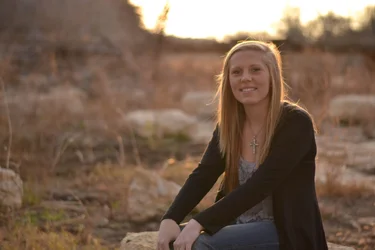
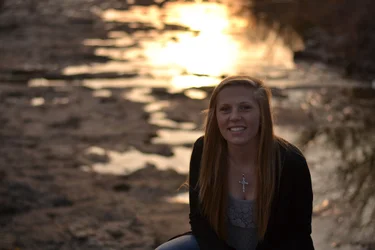
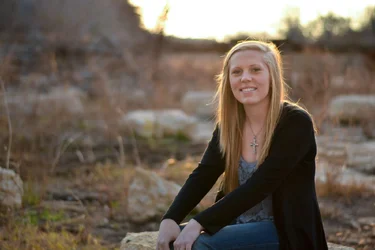
These are right out of the camera and I have not yet had pics like these...I am sure the settings in my camera were off but I am just curious if there is anything in post processing to help salvage the pics? I love ppl editing the pics but I need to understand what was done in order for me to duplicate in the future. Thanks so much! I appreciate and value any feedback.

Gayla
 

Attachments

  • $sam (1 of 1)-6.webp
    $sam (1 of 1)-6.webp
    690.8 KB · Views: 225
  • $sam (1 of 1)-7.webp
    $sam (1 of 1)-7.webp
    621.9 KB · Views: 212
what editing software do you use? have you considered copying the images and trying the editing yourself? you might find you learn faster with a hands on approach. just some quick WB fixed in Lightroom. didnt do anything else to them.


View attachment 30976
View attachment 30977
 
Last edited:
If your post processing skills are strong then these are easily saved, but if you're strengths are elsewhere, I'd scrap. Good light in #1 though !!
 
You've got a basic problem in #1 that the tonal values and colors of the girl and the background are pretty much the same. Getting good separation between her and the background is going to be tricky. Masking layers and crap like that are probably in play, and a light touch so it doesn't look like you pasted her in.

The problem with #2 is that the light on the girl is dull and flat.

In general if you're asking the question "trash or try to save?" the answer is "trash". If the photographs are important, though, give it a shot. Good luck!
 
Thanks! I use Lightroom 4 and I often second guess my editing :( Haven't been doing this long enough I guess! What I have found when I edit is that I often find myself trying to do "too much" or use all of the components to try to make a pic look great instead of focusing on what it needs specifically.
 
I played.. the WB may very well be off still, I struggle with WB but I'd be happy to walk you through what else I did to this if you care to know. lol
$sam (1 of 1)-6-2.webp
 
...I am sure the settings in my camera were off
Gayla

Welcome to the forum, Gayla.

First off, what I notice about these shots is that you're trying to capture a scene with a difficult lighting situation. Much of the scene is in shadow, dimly lit, while a small portion of it is very brightly lit (the sky in the left image, the - is that snow or water? - in the second image). Digital sensors have difficulty capturing detail in such a range of lighting, you will lose detail either in the blacks of the shadows or in the blown out bright areas (or both). In all honesty, the exposure on the left looks pretty good. Your subject in the second is very dark, but to expose to make her brighter you would have had more of a blown out area above her.

Based on your camera settings (and there are many relevant ones, from which mode you shoot in to which exposure metering method you use) your camera will do its best to make assumptions to get the best average exposure. But your camera doesn't know what it's looking at. In general it will try to average the exposure value and might not expose properly for a particular area of the frame, and that's how you arrive at photos like these. But as I said, these are difficult scenes to capture, so it's not necessarily a matter of your settings being "off" as needing to consider alternate solutions.

For example, one way to handle such a large range of lighting is to even it out over the whole frame - that is, add light to the dim areas to help balance out the bright areas. You can do this with flashes/strobes or reflectors. By brightening up the dim areas you've reduced the range the camera has to deal with and it can better properly expose for the scene. Another way would be to recompose your shot so that the bright areas are not included. For example, if the shot on the left were angled slightly differently so that there was no sky in the shot, all the camera would see is the "dim" areas and be able to properly expose for those. I do not know what camera you are using, but you may be able to set it to highlight blown out areas so you can catch them on the spot and recompose. Don't worry, handling these situations will come with time and experience (and, in some cases, more equipment).

Now, since you asked what can be done to salvage these shots in post processing, again we need to know a few things. Are you shooting in RAW or JPEG? If you shoot in RAW there is much more that can be done to salvage detail in the shadows and highlights - to a point. And the next question is what post processing software do you have at your disposal? There is a wealth of experience on this forum and many people who are good at walking you through the steps, but it's only helpful if you have the software they're familiar with.

 
You've got a basic problem in #1 that the tonal values and colors of the girl and the background are pretty much the same. Getting good separation between her and the background is going to be tricky. Masking layers and crap like that are probably in play, and a light touch so it doesn't look like you pasted her in.

The problem with #2 is that the light on the girl is dull and flat.

In general if you're asking the question "trash or try to save?" the answer is "trash". If the photographs are important, though, give it a shot. Good luck!

I generally agree with Andy.
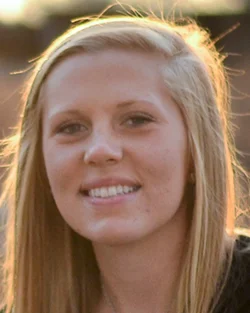
The light on her face is flat with darker eye sockets but with blotches from light reflected from the overhead sky.
There will be lots of color noise when you try to raise the exposure.
There isn't the sharpness or nice skin tone or shadows in good places and I think this would be only a disappointment to try and make this a portfolio shot or even close.
She's a lovely woman, take more pictures.


$sam-(1-of-1)-6-2snip.webp
 
I had a play,
adjusted exposure and wb. burned the background. also played with luminance colors. (lr4)

sam%2520%25281%2520of%25201%2529-6.jpg


obviously not perfect (skin tones too red). but if you HAVE to save it.
 
Great feedback for me. Right now, I am shooting in JPEG and not RAW. I also used LR4 to edit. This thread alone has been great because what it has shown me (a newbie!) is that people see things differently and a lot of editing has to do with personal preference and eye. I am so glad I found this site to read and learn from all of you!!

Gayla
 
Didn't want to raise the face too much, it started to look too obviously edited.
This could be a nice remembrance of the moment.

sam-1-of-1-6lgestllll_zps4ef2e154.jpg
 
If I had to pick between the two I would keep the first one. I would do some cloning out of the stray hairs around the face if you decide to keep it. GMulligen have you thought about buying a simple reflector maybe gold/white or gold/silver, it would have helped you out a great deal here.
 
I have not thought about reflector but will look into it. thanks
 
I have not thought about reflector but will look into it. thanks

I use a reflector in almost all of my backlit shots to bounce light back into their eyes and face.
 
I have not thought about reflector but will look into it. thanks

You can really save a buck or two and search for some reflector kits on amazon, they may not be quite as well built but will still hold up just fine and can be had for under 30$ in most cases. And since your using LR4 start shooting RAW!! It virtually adds no other steps when editing other than making sure your exporting as jpeg, which it should be set to by default.
 

Create an account or login to comment

You must be a member in order to leave a comment

Create account

Create an account on our community. It's easy!

Log in

Already have an account? Log in here.

New Topics

Back
Top Bottom