What's new

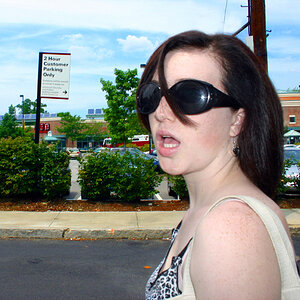
WB? Did I do better with this one?

using the silver ornament and dropper in LR3. thank you for all of the input and help with this everyone! I feel like I'm getting it.


DSC_0115-3 by lovemyhero, on Flickr
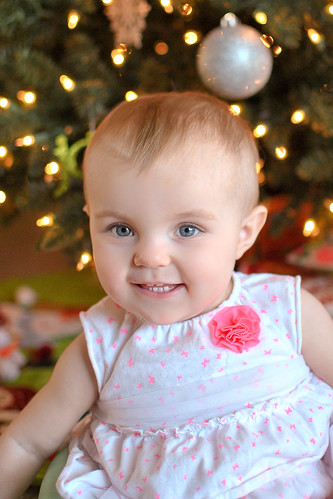

Now take that silver ornament with you everywhere you go and sneak into every photo you take; your WB problems are solved.

Joe
 
You can still use LR to check skin tones, but it is just not as detailed as PS. You will just need to learn how to read RGB values and how luminance plays a role. I rarely go into PS anymore to check my skin tones, I will just do it straight from LR4.

I have been playing with the dropper and I seem to have a hard time finding white spots that don't make the image crazy orange or yellow? Any tips? I tried using eye whites, teeth, different parts of the blouse.. and they seemed to either not change the image tones or go way yellow/orange. I'm using LR3 also.. is 4 better with this maybe?

Looks like the guys already explained that you should aim for something neutral or that is supposed to be white. I always look for something grey first. Can you e-mail me the original sized file and let me play with it? kthorsonphoto@yahoo.com
 
You can still use LR to check skin tones, but it is just not as detailed as PS. You will just need to learn how to read RGB values and how luminance plays a role. I rarely go into PS anymore to check my skin tones, I will just do it straight from LR4.

I have been playing with the dropper and I seem to have a hard time finding white spots that don't make the image crazy orange or yellow? Any tips? I tried using eye whites, teeth, different parts of the blouse.. and they seemed to either not change the image tones or go way yellow/orange. I'm using LR3 also.. is 4 better with this maybe?

Looks like the guys already explained that you should aim for something neutral or that is supposed to be white. I always look for something grey first. Can you e-mail me the original sized file and let me play with it? kthorsonphoto@yahoo.com

Sure, I'll send it over in a moment.
 
If you can't find any grey, a trick I sometimes use is to reset the black and white points - particularly if there's white. This will often punch up the contrast and/or the saturation, so additional adjustment will be needed. I did use this method, as well as the ornament as a possible grey point. I was going to post all 3 versions but needed to run to work. I felt my version was a touch cool too, but that is ok with baby skin (IMO). All fall within acceptable range, and the rest is just a matter of taste. I would have applied some slight warming to mine after removing the color cast. All of this is much easier with a RAW file too.

I'm on my work laptop at the moment and they all look like crap. ;)
Nothing is as important as a quality calibrated monitor.
 
Now that you've pointed out the silver ball.. I can't stop noticing it and now wish it was cloned out.. lol
 
Now that you've pointed out the silver ball.. I can't stop noticing it and now wish it was cloned out.. lol

Same here!! I feel like it wouldn't matter as much if there were another ball visible maybe.. but just the one is irritating me a lil as well! lol
 

Create an account or login to comment

You must be a member in order to leave a comment

Create account

Create an account on our community. It's easy!

Log in

Already have an account? Log in here.

New Topics

Back
Top Bottom