What's new

My long exposure picture is too bright

I always try to keep my ISO as low as I can while being able to maintain a decent shutter speed. I can comfortable hold a shot at 1/15 and it won't have camera shake. If I need faster speed, I up the ISO. Occasionally I'll change aperture but usually I have that set to what I'd like the DOF to turn out like. Because if I really need the extra light I don't wanna have to cut back on what can be in focus. I'd rather keep that than worry about a little noise that can be fixed.

I am going to have to get it right in my shot, i have no experience with editing software other than resizing my images.
 
When I first started a "stop" just meant "confusion" to me.
And the math didn't mean a thing at all.

The exposure meter helped me first adjust the exposure correctly before I started understanding stuff.


I was going to get Tiffen ND filters for my lens too as Heliopan/B+W are way too expensive.

Anyone know about those adjustable ND filters from 1 to 9 ... do the good ones (B+W / Heliopan) have that "X factor"?
 
I am going to have to get it right in my shot, i have no experience with editing software other than resizing my images.

Been there done that.
That's where watching the Exposure Meter is soooooo helpful to get it right the first time!!
That's exactly what I did.

Don't worry, in 10 months time you'll know ALOT more and still be lost like me :)
 
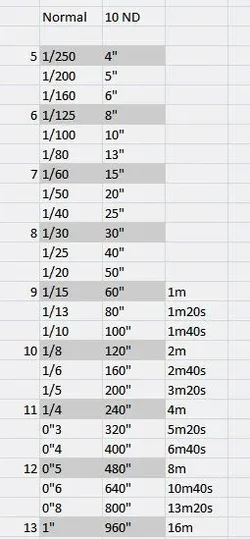
I didn't know that the cameras exposure could be set more than 30 seconds, so that's what bulb mode is for. I have seen other photographers use cheat sheets for long exposure photography. Is there maybe one i could use for my 10 stop filter?

Try this:

$10 ND filter Exposures.webp
 
as a beginner on photography this happened to me as well and so reading forums and other tutorial stuff and try it was my strategy :D it might be a trial and error but still i am learning :)
 
Been there done that. That's where watching the Exposure Meter is soooooo helpful to get it right the first time!! That's exactly what I did. Don't worry, in 10 months time you'll know ALOT more and still be lost like me :)
I don't use Lightroom to drastically change exposure. I use it to edit my photo and fix the noise and add a touch of sharpness. If you rely on post processing to get a good photo, you'll be disappointed.
 
What an awful day today. Its been raining all day long.
 
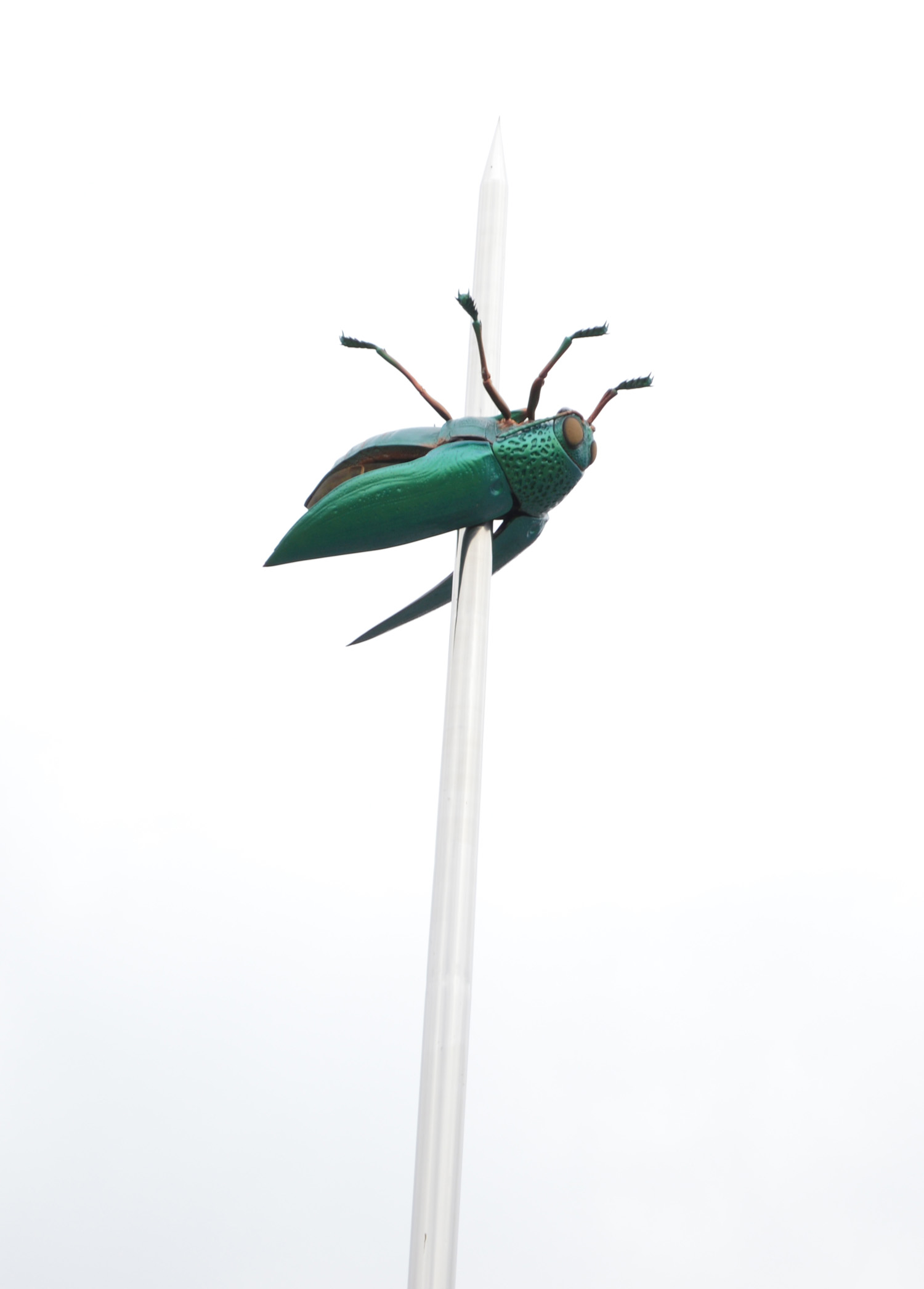
I was fooling around with the exposure meter today and i took a picture of a monument with the sky in the background.

HBFIaRC.jpg


The meter was centered and i didn't have a polarizer attached. Here is this images information
xtGow6k.jpg
 
This one i was experimenting with blurring the background. After 20 minutes of trying to figure out how to adjust my aperture, i failed to blur the background and only keep this tree in focus. I don't really know how to do that in manual mode.

qRDUmXg.jpg


HQxw6jr.jpg
 
that monument looks like a bug stuck on a car radio antenna ?
increase shutter speed a little like to 1/125 and get the exposure setting more to the right, for underexposing and the sky will come out better.
I think by default Nikon's exposure setting is "backwards" in a ways, except for the way the dial moves.

so to the left is over exposure, to the right is underexposure.

I have them reversed (or corrected) by a menu setting.


don't worry about blurring the background yet.
If you want to practice with Depth Of Field (DOF) to take a picture of a long fence, or bridge at an angle and focus in the middle at f/1.8, or the lowest setting on your lens f/3.5. Then you will be able to see the photo being blurred, go into focus, then get blurred again.
 
your tree picture wasn't there when I looked.
But DOF is dependent on alot of things for a blurry background.

If you look at the postbox in the background, it is blurred.
the square thing behind the tree was probably too close for your location and lens. But to the right you can see the bench planks starting to get blurry.

I found it best to practice ONE concept at a time. I know .. I went all over the place when I first started using manual and just confused myself. I then worked on One concept at a time until I understood it some then went on to a 2nd concept/technique.
 
To really understand the DOF concept, I found it best to purchase a 50mm - f / 1.8 lens.
That lens really made it plainly visible the DOF concepts. But your pictures show it, you just have to recognize it.
 
that monument looks like a bug stuck on a car radio antenna ?
increase shutter speed a little like to 1/125 and get the exposure setting more to the right, for underexposing and the sky will come out better.
I think by default Nikon's exposure setting is "backwards" in a ways, except for the way the dial moves.

so to the left is over exposure, to the right is underexposure.

I have them reversed (or corrected) by a menu setting.


don't worry about blurring the background yet.
If you want to practice with Depth Of Field (DOF) to take a picture of a long fence, or bridge at an angle and focus in the middle at f/1.8, or the lowest setting on your lens f/3.5. Then you will be able to see the photo being blurred, go into focus, then get blurred again.

That monument is to honor science. Personally i would have gone with a cute lab rat.


I actually tried to lower my aperture number, but it won't go lower than f5. Also i actually didn't know that the lens dictated the apertures range. It makes sense though now that i think about it.
 

Create an account or login to comment

You must be a member in order to leave a comment

Create account

Create an account on our community. It's easy!

Log in

Already have an account? Log in here.

New Topics

Back
Top Bottom