What's new

Nikon 55~200 AFS

Guys,
The lighting animal is HUGE. it's like taking a masters. It needs time and money, and experimentation. The lens is a minor problem compared to the lighting
I am testing this AFS 50mm Nikon 1.8g lens I just received, and find it's sharpest point is around F 6~8 (for bags anyway). Yes it's marginally sharper than the 18-55 or the 55-200 cheapo zoom.
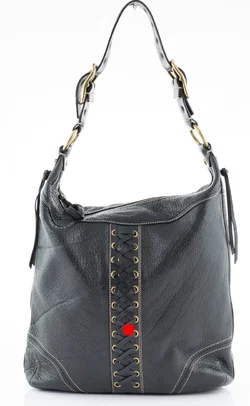
The problem is that it is only marginally sharper. I noticed one thing though with this prime lens. The hot spots have more blue tone in them. Anyone know why? Here is a pic taken with the new lens f 7.1 1/8s @50mm ISO 100

I would not try to guess if the blue tone was lens or light related. You would need to take shots with the 18-55mm and then with the 50mm with the same lighting and White Balance setting to see if it is a lens issue. The lenses can have a difference in how they render color, but generally the concern is if there is strong chromatic aberration. Most often the issue is the lighting and it can be a White Balance issue. It does seem a bit hot at the point you indicated, sometimes you can use a flag to remove some light from specific parts of the subject.

Neither the 18-55 or the 55-200 have ever given me blue reflections. Maybe it was just that one shot. If it repeats I shall return the lens.
Sorry do not understand flag. I will google the word flag as it applies here.
 
Might try reducing the light reaching the areas with reflections. You just need to have a way to put something in that part of the light path. It can also help moving around the light positions, this can have a huge effect on reflections. Start with one light on and check things then add another light and repeat until you have all your lights on.
 
Might try reducing the light reaching the areas with reflections. You just need to have a way to put something in that part of the light path. It can also help moving around the light positions, this can have a huge effect on reflections. Start with one light on and check things then add another light and repeat until you have all your lights on.

Ok got it,,I need to block or drastically reduce that portion/section/emission of light that is causing the reflections in that particular part of the bag, without diminishing light output too much...Hmmm!.
 
I moved the lights around the tent as opposed to facing the bag. Kept the same F @ 7.1, but had to increase S value to 1/6 (as opposed to 1/30) because of the light I took away. The reflections are gone, but now The image is blurry.
The red dot is where i focused..
 

Attachments

  • lights2.webp
    lights2.webp
    263.2 KB · Views: 93
Are raw shots always a little blurry? I have now tried a few premium lenses, and all raw shots look somewhat blurry when magnified 100% in photoshop.
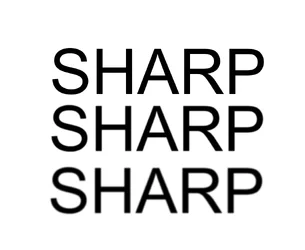
I think at this stage we need to define the word sharp. Here is a jpeg. Only the first word is totally sharp. Obviously the original uncompressed vector is even sharper than the jpeg.
The second and third words are blurry (in my eyes anyway). Is it possible to take a 100% sharp picture with a camera?
 

Attachments

  • SHARP.webp
    SHARP.webp
    28.5 KB · Views: 99
I marvel at how long this thread is going without the OP (that's you, Quovadis) making any real progress.

I get the idea that you have never cracked a book, never seen your user's manual, and only know some terms that your professional photographer friend has mentioned in casual conversation.

Since you know someone, can you ask him to come to your house and set up the shot for you? That would be the fastest, simplest way to get this done, IMO.
 
You HAVE TO sharpen RAW files.
 
Ok guys, i think I have found the root of confusion, and the error, not leading to sharp photos.
I have been trying to make my shutter speed faster. My objects are not moving, they are bags.
To make matters worse some guy (That i could strangle if i could) in this forum suggested I use nothing slower than 1/60.
I was getting dark images and everyone was marginally out of focus. Some were more out of focus than others, but they were not 100% sharp.
To make matters more difficult I was cranking up my exposure setting to +2 +3, trying to compensate for a dark image.
Then, we all assumed that this was the lights, not enough light, we also assumed that the 18-55 and the 55-200 were crappy lenses, and I needed a prime.
The problem is that when i received the primes (yes.. I have 3 of the little buggers here) A 40mm a 50mm and the 60mm. These primes were behaving the same identical way as the cheaper lenses.
Today, by chance, or act of rage, I went in the other direction with the S values...S 0.5 and slower. I set exposure compensation at 0.00, and I always shoot at 100 ISO because i am phobic about noise.
The f stops on bags HAVE TO BE in between 6~11. Any low F stop, 1.8 or thereabouts, makes 99% of the bag be out of focus.
Now every image on a SLOWER S is OVERLY exposed, but it's razor sharp. All i have to do is lessen the exposure in the RAW software, and voila!!.
Now, as to why using a slower shutter speed is giving me crispy images as opposed to using a faster one which gives me blurry pictures, I have no idea why, but there must be some logical explanation. Not only is the bag over exposed, but to my delight, the background is pure white also.
Now, I need to understand how to take a normally exposed picture and have it sharp too.
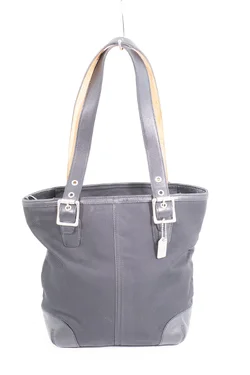
Here is the picture, not yet retouched. This is what the raw file looks like. I know it looks awful, but at least its razor sharp.
 

Attachments

  • overex.webp
    overex.webp
    285 KB · Views: 116
Ok guys, i think I have found the root of confusion, and the error, not leading to sharp photos.
I have been trying to make my shutter speed faster. My objects are not moving, they are bags.
To make matters worse some guy (That i could strangle if i could) in this forum suggested I use nothing slower than 1/60.
I was getting dark images and everyone was marginally out of focus. Some were more out of focus than others, but they were not 100% sharp.
To make matters more difficult I was cranking up my exposure setting to +2 +3, trying to compensate for a dark image.
Then, we all assumed that this was the lights, not enough light, we also assumed that the 18-55 and the 55-200 were crappy lenses, and I needed a prime.
The problem is that when i received the primes (yes.. I have 3 of the little buggers here) A 40mm a 50mm and the 60mm. These primes were behaving the same identical way as the cheaper lenses.
Today, by chance, or act of rage, I went in the other direction with the S values...S 0.5 and slower. I set exposure compensation at 0.00, and I always shoot at 100 ISO because i am phobic about noise.
The f stops on bags HAVE TO BE in between 6~11. Any low F stop, 1.8 or thereabouts, makes 99% of the bag be out of focus.
Now every image on a SLOWER S is OVERLY exposed, but it's razor sharp. All i have to do is lessen the exposure in the RAW software, and voila!!.
Now, as to why using a slower shutter speed is giving me crispy images as opposed to using a faster one which gives me blurry pictures, I have no idea why, but there must be some logical explanation. Not only is the bag over exposed, but to my delight, the background is pure white also.
Now, I need to understand how to take a normally exposed picture and have it sharp too.
Here is the picture, not yet retouched. This is what the raw file looks like. I know it looks awful, but at least its razor sharp.
Please feel free to come and strangle me anytime you wish. I suggest you pack a lunch, it will no doubt turn into a very long day for you.

Fyi, the big problem here was that you only read part of the suggestion and kept insisting on a iso that was too low for the lighting you had available at the time. But by all means, feel free to blame me.


Sent from my N9518 using Tapatalk
 
Ok guys, i think I have found the root of confusion, and the error, not leading to sharp photos.
I have been trying to make my shutter speed faster. My objects are not moving, they are bags.
To make matters worse some guy (That i could strangle if i could) in this forum suggested I use nothing slower than 1/60.
I was getting dark images and everyone was marginally out of focus. Some were more out of focus than others, but they were not 100% sharp.
To make matters more difficult I was cranking up my exposure setting to +2 +3, trying to compensate for a dark image.
Then, we all assumed that this was the lights, not enough light, we also assumed that the 18-55 and the 55-200 were crappy lenses, and I needed a prime.
The problem is that when i received the primes (yes.. I have 3 of the little buggers here) A 40mm a 50mm and the 60mm. These primes were behaving the same identical way as the cheaper lenses.
Today, by chance, or act of rage, I went in the other direction with the S values...S 0.5 and slower. I set exposure compensation at 0.00, and I always shoot at 100 ISO because i am phobic about noise.
The f stops on bags HAVE TO BE in between 6~11. Any low F stop, 1.8 or thereabouts, makes 99% of the bag be out of focus.
Now every image on a SLOWER S is OVERLY exposed, but it's razor sharp. All i have to do is lessen the exposure in the RAW software, and voila!!.
Now, as to why using a slower shutter speed is giving me crispy images as opposed to using a faster one which gives me blurry pictures, I have no idea why, but there must be some logical explanation. Not only is the bag over exposed, but to my delight, the background is pure white also.
Now, I need to understand how to take a normally exposed picture and have it sharp too.
Here is the picture, not yet retouched. This is what the raw file looks like. I know it looks awful, but at least its razor sharp.
Please feel free to come and strangle me anytime you wish. I suggest you pack a lunch, it will no doubt turn into a very long day for you.


Sent from my N9518 using Tapatalk

It's a figure of speech, however, you have no idea how much grief this has caused. I know you were trying to do good. I was convinced it was the lack of light and the cheapo lenses also. The important thing now is to understand why higher shutter speeds are giving me a blurry image, and slower shutter speeds are giving me crisp over exposed images.
 

Create an account or login to comment

You must be a member in order to leave a comment

Create account

Create an account on our community. It's easy!

Log in

Already have an account? Log in here.

Back
Top Bottom